It is a frustrating experience: you see a shaking green leaf on your ancestor’s profile, you click it with excitement, and instead of a record, you get an error message: “This hint is no longer available.”
This is not a bug in your computer. It is a synchronization delay in Ancestry’s system.
This guide explains why these “ghost hints” appear, where they come from, and when they will finally disappear from your tree.
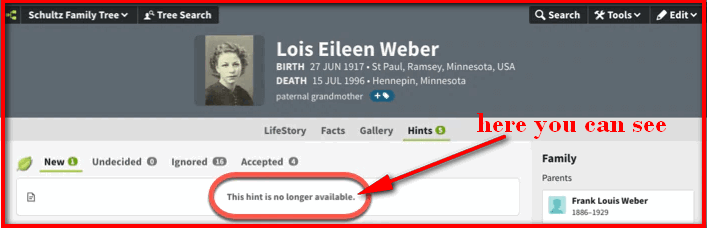
What Causes the “This Hint Is No Longer Available” Message?
Ancestry Hints are generated by a massive computer algorithm that scans millions of trees and records. However, this scan does not happen in real-time every second.
Here is the sequence that causes the error:
- The Match: The algorithm finds a photo or record in another user’s public tree that matches your ancestor. It creates a “Hint” (the green leaf) on your tree.
- The Change: A few days later, that other user decides to delete their family tree or make it private.
- The Lag: The actual data is gone immediately, but the “Hint” notification on your dashboard is still waiting there.
- The Click: When you click the leaf, Ancestry tries to fetch the data, finds it missing, and gives you the “Unavailable” error.
Common Reasons Ancestry Hints Become Unavailable
There are three main reasons a valid hint suddenly becomes invalid:
1. Tree Was Made Private by the Owner
This is the most common cause. Many users start with a public tree, but as they get deeper into research, they decide to make their Ancestry tree private.
- Result: The data still exists, but you no longer have permission to see it. The hint will linger until Ancestry’s system updates the privacy permissions in the hint index.
2. Original Record or Photo Was Deleted
The other user might have realized they made a mistake. If they delete a fact or event (like an incorrect death date) or remove a photo that generated the hint, the link is broken.
- Result: The hint points to a file that no longer exists on the server.
3. Ancestry Record Database Updates or Reindexing
Occasionally, Ancestry updates or reorganizes its record collections. During this maintenance, specific image links might be temporarily broken, causing hints to fail until the collection is fully re-indexed.
How to Remove or Clear Unavailable Ancestry Hints
Unfortunately, you cannot manually force-delete these hints.
Because the error happens before the hint fully loads, you typically cannot click the “Ignore” or “Reject” button. You simply have to wait.
- The Automatic Fix: Ancestry’s system periodically re-indexes all trees. When the “bot” crawls the site again (usually every few weeks) and sees that the source data is missing, it will automatically remove the green leaf from your tree.
- If the owner reverses the change: If the user decides to make their tree public again, the hint will suddenly start working.
Frequently Asked Questions
If you can see the name of the tree before the error pops up, yes. You can try searching for the user in the Member Directory and messaging them. However, if the hint fails to load entirely, you won’t know who to contact.
Yes, temporarily. The number on the green leaf (e.g., “5 Hints”) includes these ghost hints until the system purges them.
No, because you cannot control other users’ actions. However, this is a good reminder to process your own hints regularly. If you see a good hint, accept it and save the record to your tree immediately. Once you save it, you have a copy, even if the original owner deletes their tree later.
Conclusion
An “Unavailable Hint” is simply a sign that you missed the window to view a specific piece of information. The best strategy is to ignore it. Ancestry’s automated maintenance tools will eventually sweep through and clean up these broken links, leaving you with only the active, valid hints to review.
Add Comment